How to read Alpha patterns
One square is one knot. Learn to count base strings, match the color key and follow alternating rows with an original 8-column practice chart.
On MyBeadPattern charts, row 1 travels left to right, row 2 right to left, and the direction alternates. The drawing stays in the same orientation. Reverse your reading order on backward rows, not the image.
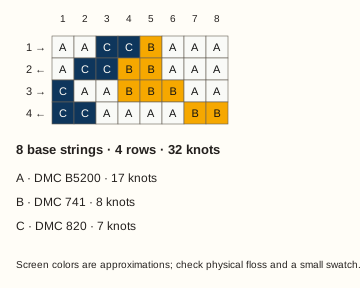
8 base strings · 4 rows · 3 colors · 32 knots
What you need before reading
Keep the full chart, its color key and a pencil or row marker together. To knot the design, you also need base strings, working floss in the chosen colors, scissors and a clip or tape to hold your setup. Learn forward and backward knots before starting.
This guide explains the chart. Starts, edge techniques, color switching and finishing need their own knotting instructions. Masha Knots' Alpha reading tutorial is a separate next step for the knotting demonstration.
1. Count columns and distinguish the strings
Count squares across the chart, not the number of colored strands in a thumbnail. Our example has 8 columns, so it uses 8 fixed base strings. Its 4 rows describe 4 passes; they do not give a finished length in centimeters.
Base strings support the knots. Working or leading strings form the visible knot colors in the interchangeable-leading-string method illustrated here. A width of eight is not a promise of eight total strands: the working colors and your start may need additional strands.
Other sites may label these counts differently. BraceletBook's FAQ, for example, says its Alpha “Strings” figure includes one leading string as well as the base strings. Check the actual grid width instead of copying that label into this generator.
2. Read the key, including the background
The same letter marks the same color wherever it appears. In this original practice chart, the legend is generated from all 32 squares:
- A · DMC B5200 · 17 knots
- B · DMC 741 · 8 knots
- C · DMC 820 · 7 knots
Use the letter as well as the color to identify a square in the full chart above. Background knots count just like motif knots; none of the white squares are empty cells.

3. Read row 1, then start row 2 at the other edge
Row 1 begins at column 1. Count each consecutive color group in the direction of the arrow. For row 2, begin at column 8 and work back toward column 1; the columns do not move.
| Row | Travel and color runs |
|---|---|
| 1 → | Left to right2 × B5200 · 2 × 820 · 1 × 741 · 3 × B5200 |
| 2 ← | Right to left3 × B5200 · 2 × 741 · 2 × 820 · 1 × B5200 |
| 3 → | Left to right1 × 820 · 2 × B5200 · 3 × 741 · 2 × B5200 |
| 4 ← | Right to left2 × 741 · 4 × B5200 · 2 × 820 |
Row 2 checkpoint: 3 knots of DMC B5200, then 2 knots of DMC 741, then 2 knots of DMC 820, then 1 knot of DMC B5200. These groups add to 8, exactly one pass across the 8 base strings. The first printed square at the left of row 2 is the last knot you work in that row.
The row arrows here show travel. They are not the individual knot symbols used by some traditional two-color letter Alpha charts. That method can use a base string to form a contrasting knot; its symbol key matters. See the scope of the two-color letter-pattern tutorial rather than treating every chart's arrows as identical instructions.
4. Check the row before moving the marker
At the end of a row, count the knots, check the last color at that edge and mark the row complete. Move to the next row only after checking the count against the chart width. If you pause, note both the row number and the next column in working order.
Keep letters and asymmetric motifs upright on the page. Changing the travel direction does not mirror a name or swap the left and right sides of the picture. The alternating-row structure is also described in Masha Knots' Chapter 7 preview.
Alpha pattern reading FAQ
Why does my second row look mirrored?
Keep the chart upright and start row 2 at its right edge. Reverse the order you read, not the picture or the printed columns. The asymmetric practice diagram shows this: row 2 starts at the last column while the drawing stays fixed.
Why am I short of knots at the end of a row?
Count the background squares too. Each practice row contains 8 knots, including white ones; its color groups always add to 8. A white square is not an instruction to skip a base string.
Why does a site's Strings label differ from the grid width?
Sites can include a working string, count folded strands or use another convention. On these charts, the 8 columns mean 8 fixed base strings. Your working colors and chosen start can require additional strands.
Does the chart show how to make a clean color switch?
It shows which color comes next, not how to introduce or carry that thread. For a gap or uneven edge, pause at the transition and follow your chosen Alpha color-switch technique. Changing a chart cell does not teach or fix the knotting technique.
Can I turn rows and color counts into thread lengths?
Not exactly. Rows are knot counts rather than centimeters, and color counts are not floss-length requirements. Measure your own small swatch and allow for the start and ties before adding rows or cutting all the base strings.
Practice, then choose another chart
Print the four-row example and check each row against its color runs. Then browse the Alpha pattern collection for a short repeat band or motif panel. Its PDFs use the same coordinate and row-travel convention.
To edit this practice chart, download its clean source PNG, open the unchanged Alpha generator, set Pattern width to 8 and Maximum colors to 3, then upload the source and select Generate from image. It is an 8 × 4 pixel image, not the labeled chart or PDF.
Check the row runs and colors before editing. The tool processes images in the browser; this guide does not add an upload service or one-click handoff. For color-reference limitations, read the DMC data method.