01
A simple image
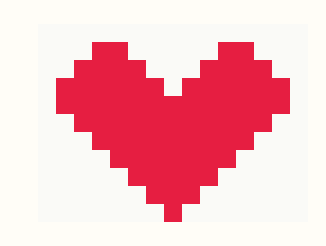
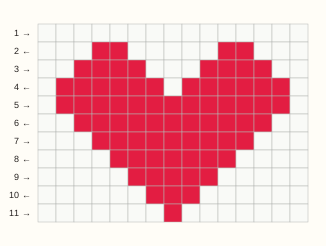
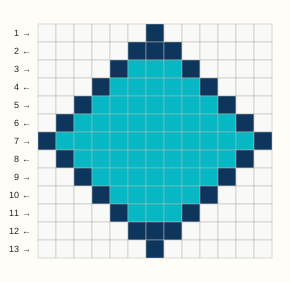
A clear silhouette needs only two colors. This illustration is mapped with the same DMC matching functions as your uploaded image.
15 base strings × 11 rows · 2 colors · 165 knots
Free · private · in-browser
Turn an image, logo, name or short text into an editable alpha friendship bracelet pattern. Match a focused DMC floss palette, fix any knot and export a chart you can follow row by row.
15 base strings × 11 rows
Ready. Each cell is one knot; odd rows work right, even rows work left.
See the process
Start with one of these original examples. Each preview comes from the same knot data you can load, edit and export in the generator. These are chart previews, not photographs of finished bracelets.
A clear silhouette needs only two colors. This illustration is mapped with the same DMC matching functions as your uploaded image.
15 base strings × 11 rows · 2 colors · 165 knots
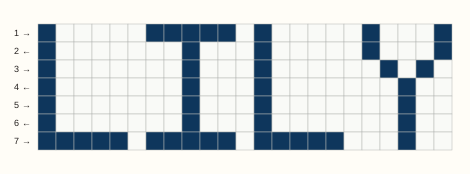
Four letters fit across 23 base strings. The built-in lettering is seven rows high; check your knot gauge before planning the finished size.
23 base strings × 7 rows · 2 colors · 161 knots

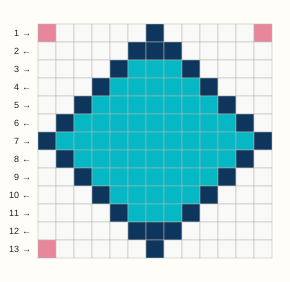
This is a manual cleanup example, not automatic retouching. Load the draft and replace DMC 603 with B5200, or open the cleaned chart.
13 base strings × 13 rows · 3 colors · 169 knots
Opening an example replaces the visible chart; Undo restores your previous chart. Use Download PNG or Download color PDF in the editor to export. Physical thread colors and knot proportions need a small swatch check.
The converter handles the first draft. You stay in control of the width, colors and every individual knot.
Upload, paste, type a short name, open an original sample or start with a blank grid.
Choose 8–40 base strings and a focused two-to-eight-color palette for a readable bracelet.
Paint, erase, fill, pick colors, replace a shade everywhere and undo up to 100 edits.
Use the alternating row guide, download a labeled PNG or print the chart to paper or PDF.
This is a knot chart, not just a pixel-art preview. The output keeps directions, counts and practical caveats attached to the grid.
Every row is labeled with its working direction: forward knots on odd rows and backward knots on even rows.
Convert into common floss codes, switch the paint color or replace one shade across the entire design.
See knot count, base strings, pattern face size and working-thread planning after entering your own swatch gauge.
Your source image is sampled inside this page. It is not sent to an image-processing or storage endpoint.
A smaller chart is faster to knot, but it also has less room for detail. Check the silhouette before adding more colors.
Crop away the background in your image editor first, leaving a small margin around the subject. Start with a simple, high-contrast image. Compare widths of 18, 24 and 32 knots: keep the smallest grid that still shows the features you need. More base strings mean a wider piece at the same knot gauge.
Try two to four colors before increasing the limit. Inspect isolated knots and short color runs. Use Paint for a few cells, or Replace color to merge an unnecessary shade across the chart. Review the result before exporting; the generator does not automatically repair every awkward color change.
This preview uses square cells, while your physical knots may not be square. Make a small test swatch and compare its width and height. For image input, adjust the source proportions in an image editor before converting again. The size estimate is a planning aid, not a guarantee of finished proportions.
The text tool accepts up to six Latin letters or numbers in a five-by-seven pixel alphabet. Try initials or a shorter name, or upload an image of your own lettering. Tiny curved text often needs a wider grid and manual cleanup.
Try another image · Practice with an example · Check the DMC color references
An alpha pattern is a row-based knot chart made across fixed base strings with one or more working thread colors. This generator shows every knot color and alternates the working direction by row.
Yes. Upload or paste an image, set a width from 8 to 40 knots and choose two to eight colors. Simple, high-contrast artwork usually converts most clearly.
The 26-color set is a compact planning reference, not the complete catalog. Screen colors and dye lots vary, so compare the chart with physical floss in your lighting before cutting thread. Read about the DMC references and matching method.
No. Image sampling, color matching and editing run in your browser. This alpha tool does not upload the source image or generated chart.
Begin with row 1 from left to right using forward knots. Turn the working direction for row 2 and use backward knots from right to left. The color runs are already written in that working order.
Use the estimate only as a planning aid. Make a swatch, enter its millimeters per knot and your typical thread allowance, then add tails and extra length for frequent color changes.
Keep the medium straight: use the bracelet chart here, or switch to the bead editor for pegboard projects.