Alpha bracelet patterns

Find a chart you want to knot. Choose from 12 original Alpha designs, compare base strings and colors, then get a free printable PDF or a clean PNG to edit.

12 original charts · Free PDF + source PNG

Short motif panels and repeat bands. Check your own knot gauge before planning a full bracelet.

Added
Guide updated

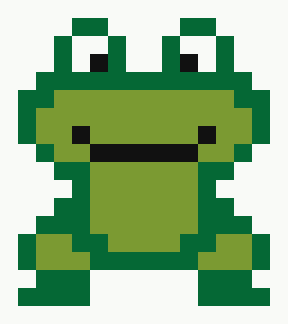
Frog alpha pattern: 16 base strings, 18 rows, 4 colors

Frog alpha pattern
16 strings × 18 rows · 4 colors

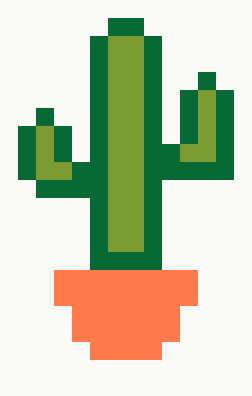
Cactus alpha pattern: 14 base strings, 22 rows, 4 colors

Cactus alpha pattern
14 strings × 22 rows · 4 colors

Actual source-grid previews, not finished-bracelet photos.
Choose a pattern
12 of 12 patterns
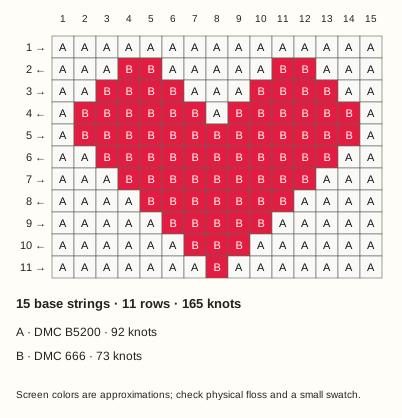
Heart Alpha chart: 15 base strings, 11 rows, 2 colors
Digital knot chart · Hearts

Heart

15 base strings × 11 rows
2 colors · 165 knots

A single red heart with a white knot border. Use the center row as a checkpoint before the point narrows.

Row 5 contains one white knot, thirteen red knots and one white knot.

Edit pattern
  1. Download source PNG — one pixel per knot, 15 × 11 pixels. It looks tiny until enlarged.
  2. Open Alpha generator. Set Pattern width to 15 and Maximum colors to 2.
  3. Choose the downloaded PNG, then select Generate from image. Compare the dimensions and colors with this card before editing.

Upload the clean source, not the PDF or labeled chart. This is a manual import, not one-click loading.

Original MyBeadPattern matrix · Source record · no finished-bracelet photo.

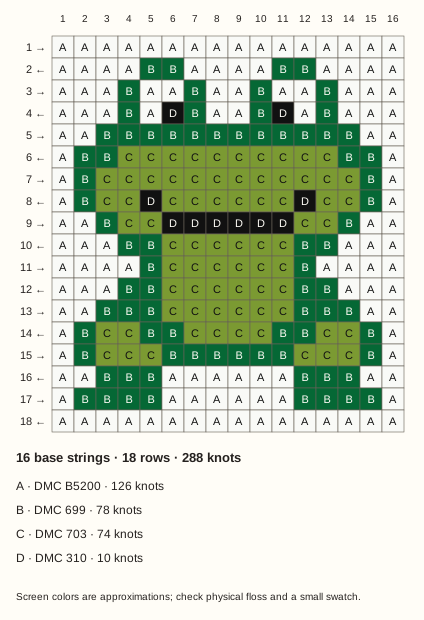
Frog alpha pattern: 16 base strings, 18 rows, 4 colors
Digital knot chart · Nature

Frog alpha pattern

16 base strings × 18 rows
4 colors · 288 knots

A seated green frog with raised white eyes, a black smile and two wide feet. This four-color motif is a short panel; add background rows only after checking your own knot gauge.

Row 4 has black pupils at columns 6 and 11. The six black knots at columns 6–11 in row 9 form the bottom of the smile.

Edit pattern
  1. Download source PNG — one pixel per knot, 16 × 18 pixels. It looks tiny until enlarged.
  2. Open Alpha generator. Set Pattern width to 16 and Maximum colors to 4.
  3. Choose the downloaded PNG, then select Generate from image. Compare the dimensions and colors with this card before editing.

Upload the clean source, not the PDF or labeled chart. This is a manual import, not one-click loading.

Original MyBeadPattern matrix · Source record · no finished-bracelet photo.

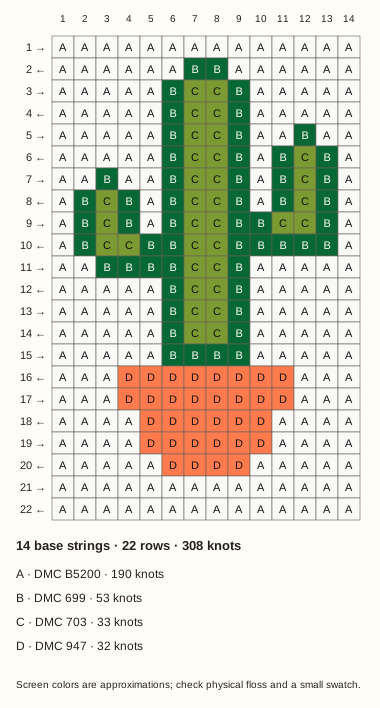
Cactus alpha pattern: 14 base strings, 22 rows, 4 colors
Digital knot chart · Nature

Cactus alpha pattern

14 base strings × 22 rows
4 colors · 308 knots

A two-tone green cactus in an orange pot. Its right arm starts higher than the left, so keep the picture upright when a working row travels backward.

The right arm starts at row 5, column 12; the left starts at row 7, column 3. The pot rim is eight orange knots wide, at columns 4–11 in row 16.

Edit pattern
  1. Download source PNG — one pixel per knot, 14 × 22 pixels. It looks tiny until enlarged.
  2. Open Alpha generator. Set Pattern width to 14 and Maximum colors to 4.
  3. Choose the downloaded PNG, then select Generate from image. Compare the dimensions and colors with this card before editing.

Upload the clean source, not the PDF or labeled chart. This is a manual import, not one-click loading.

Original MyBeadPattern matrix · Source record · no finished-bracelet photo.

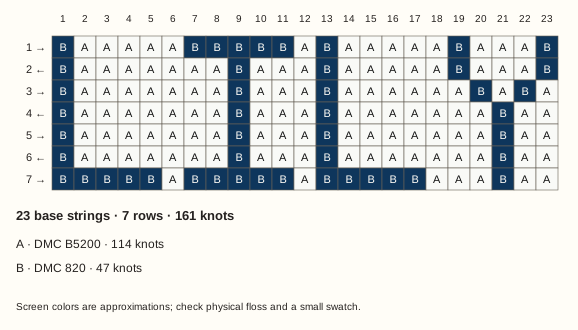
LILY letter panel Alpha chart: 23 base strings, 7 rows, 2 colors
Digital knot chart · Letters

LILY letter panel

23 base strings × 7 rows
2 colors · 161 knots

Four upright letters on a dark blue field. The chart is a short name panel, not a full wrist-length bracelet.

Read the chart from its printed top edge. Backward-row travel does not mirror the letters.

Edit pattern
  1. Download source PNG — one pixel per knot, 23 × 7 pixels. It looks tiny until enlarged.
  2. Open Alpha generator. Set Pattern width to 23 and Maximum colors to 2.
  3. Choose the downloaded PNG, then select Generate from image. Compare the dimensions and colors with this card before editing.

Upload the clean source, not the PDF or labeled chart. This is a manual import, not one-click loading.

Original MyBeadPattern matrix · Source record · no finished-bracelet photo.

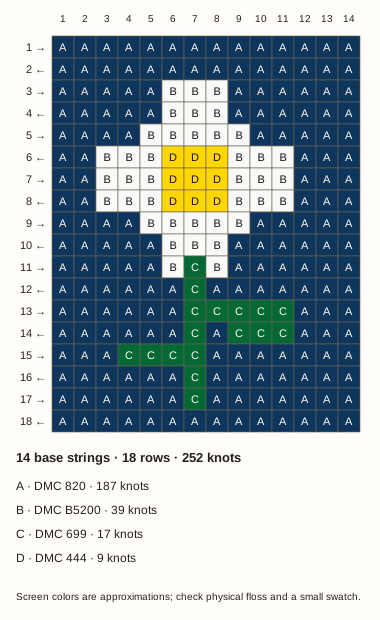
Daisy Alpha chart: 14 base strings, 18 rows, 4 colors
Digital knot chart · Nature

Daisy

14 base strings × 18 rows
4 colors · 252 knots

White petals surround a yellow center on a navy field. The narrow stem and offset leaves make the bottom half deliberately asymmetric.

The yellow center is a 3 × 3 block; keep the stem under its left-center column.

Edit pattern
  1. Download source PNG — one pixel per knot, 14 × 18 pixels. It looks tiny until enlarged.
  2. Open Alpha generator. Set Pattern width to 14 and Maximum colors to 4.
  3. Choose the downloaded PNG, then select Generate from image. Compare the dimensions and colors with this card before editing.

Upload the clean source, not the PDF or labeled chart. This is a manual import, not one-click loading.

Original MyBeadPattern matrix · Source record · no finished-bracelet photo.

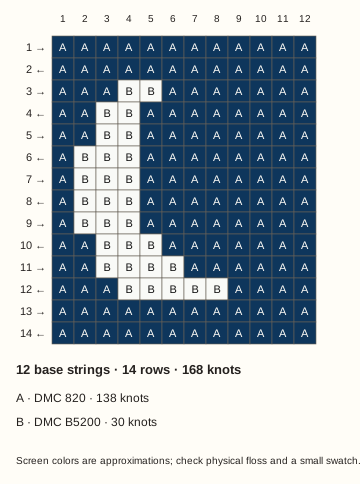
Crescent moon Alpha chart: 12 base strings, 14 rows, 2 colors
Digital knot chart · Nature

Crescent moon

12 base strings × 14 rows
2 colors · 168 knots

A pale crescent on a navy field, open toward the right. The empty-looking navy areas still represent actual knots.

Keep the opening to the right; a reversed even-row reading order should not change the silhouette.

Edit pattern
  1. Download source PNG — one pixel per knot, 12 × 14 pixels. It looks tiny until enlarged.
  2. Open Alpha generator. Set Pattern width to 12 and Maximum colors to 2.
  3. Choose the downloaded PNG, then select Generate from image. Compare the dimensions and colors with this card before editing.

Upload the clean source, not the PDF or labeled chart. This is a manual import, not one-click loading.

Original MyBeadPattern matrix · Source record · no finished-bracelet photo.

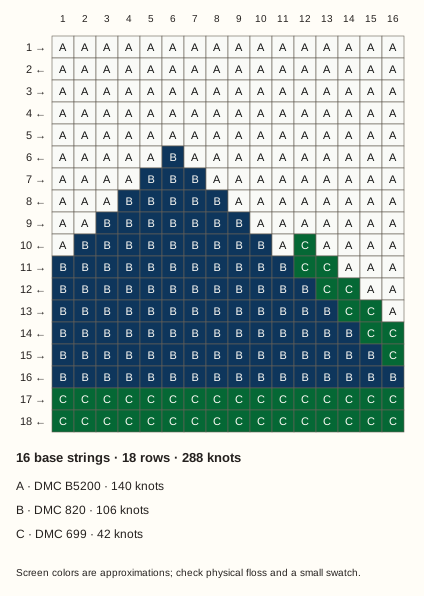
Mountain ridge Alpha chart: 16 base strings, 18 rows, 3 colors
Digital knot chart · Nature

Mountain ridge

16 base strings × 18 rows
3 colors · 288 knots

Two offset peaks meet a green ground strip. Follow the higher left peak first, then check where the lower right ridge begins.

The taller peak starts at row 6, column 6; the last two rows are green.

Edit pattern
  1. Download source PNG — one pixel per knot, 16 × 18 pixels. It looks tiny until enlarged.
  2. Open Alpha generator. Set Pattern width to 16 and Maximum colors to 3.
  3. Choose the downloaded PNG, then select Generate from image. Compare the dimensions and colors with this card before editing.

Upload the clean source, not the PDF or labeled chart. This is a manual import, not one-click loading.

Original MyBeadPattern matrix · Source record · no finished-bracelet photo.

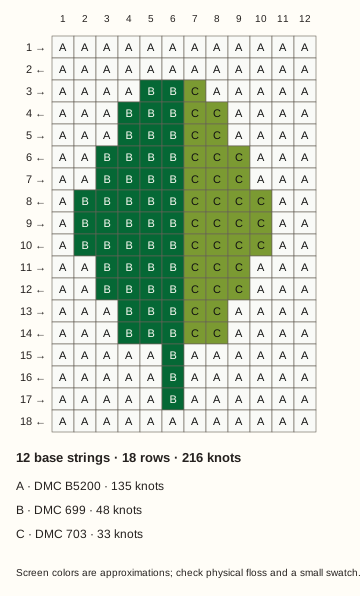
Two-tone leaf Alpha chart: 12 base strings, 18 rows, 3 colors
Digital knot chart · Nature

Two-tone leaf

12 base strings × 18 rows
3 colors · 216 knots

Light and dark green halves share one central vein. This panel makes it easy to notice a missed color boundary.

Column 6 is the dark-green side of the vein; the stem continues below the leaf.

Edit pattern
  1. Download source PNG — one pixel per knot, 12 × 18 pixels. It looks tiny until enlarged.
  2. Open Alpha generator. Set Pattern width to 12 and Maximum colors to 3.
  3. Choose the downloaded PNG, then select Generate from image. Compare the dimensions and colors with this card before editing.

Upload the clean source, not the PDF or labeled chart. This is a manual import, not one-click loading.

Original MyBeadPattern matrix · Source record · no finished-bracelet photo.

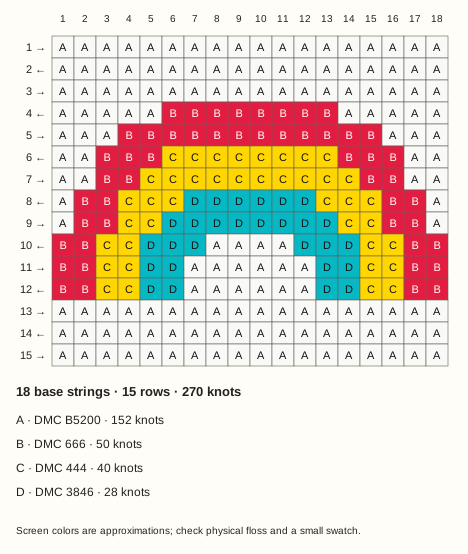
Three-band rainbow Alpha chart: 18 base strings, 15 rows, 4 colors
Digital knot chart · Nature

Three-band rainbow

18 base strings × 15 rows
4 colors · 270 knots

Red, yellow and turquoise bands form a stepped arch. The white center is part of the knot chart, not a hole.

All three colored bands stop at the same baseline; three white rows remain underneath.

Edit pattern
  1. Download source PNG — one pixel per knot, 18 × 15 pixels. It looks tiny until enlarged.
  2. Open Alpha generator. Set Pattern width to 18 and Maximum colors to 4.
  3. Choose the downloaded PNG, then select Generate from image. Compare the dimensions and colors with this card before editing.

Upload the clean source, not the PDF or labeled chart. This is a manual import, not one-click loading.

Original MyBeadPattern matrix · Source record · no finished-bracelet photo.

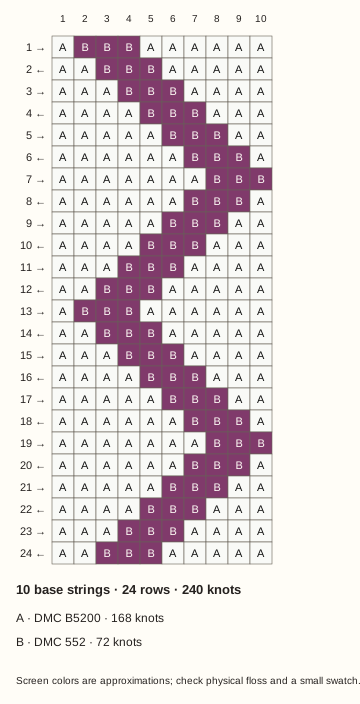
Narrow zigzag band Alpha chart: 10 base strings, 24 rows, 2 colors
Digital knot chart · Geometric

Narrow zigzag band

10 base strings × 24 rows
2 colors · 240 knots

A purple stripe moves diagonally and turns back across a ten-string band. The 24-row chart contains two repeat units.

The direction turn belongs to the motif; it is separate from the alternating working-row arrows.

Edit pattern
  1. Download source PNG — one pixel per knot, 10 × 24 pixels. It looks tiny until enlarged.
  2. Open Alpha generator. Set Pattern width to 10 and Maximum colors to 2.
  3. Choose the downloaded PNG, then select Generate from image. Compare the dimensions and colors with this card before editing.

Upload the clean source, not the PDF or labeled chart. This is a manual import, not one-click loading.

Original MyBeadPattern matrix · Source record · no finished-bracelet photo.

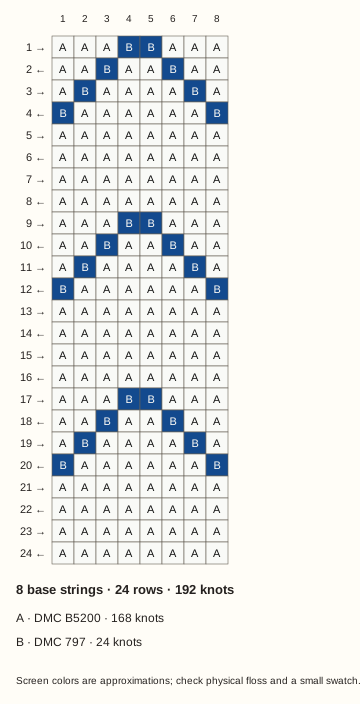
Arrow repeat band Alpha chart: 8 base strings, 24 rows, 2 colors
Digital knot chart · Geometric

Arrow repeat band

8 base strings × 24 rows
2 colors · 192 knots

Paired blue diagonals form three downward-pointing chevrons. White spacer rows separate the repeats.

Each chevron reaches both outside columns on its fourth row; four spacer rows follow.

Edit pattern
  1. Download source PNG — one pixel per knot, 8 × 24 pixels. It looks tiny until enlarged.
  2. Open Alpha generator. Set Pattern width to 8 and Maximum colors to 2.
  3. Choose the downloaded PNG, then select Generate from image. Compare the dimensions and colors with this card before editing.

Upload the clean source, not the PDF or labeled chart. This is a manual import, not one-click loading.

Original MyBeadPattern matrix · Source record · no finished-bracelet photo.

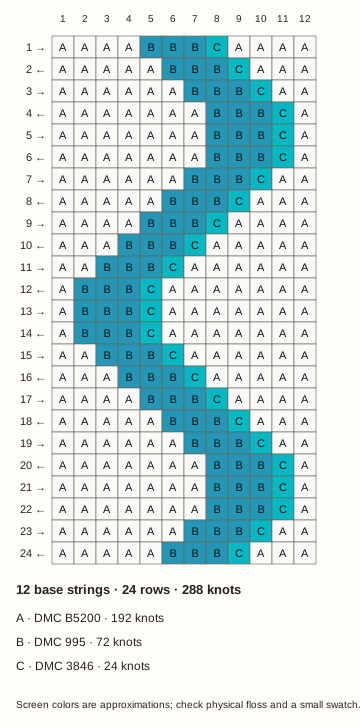
Blue wave band Alpha chart: 12 base strings, 24 rows, 3 colors
Digital knot chart · Geometric

Blue wave band

12 base strings × 24 rows
3 colors · 288 knots

A dark blue wave with a turquoise accent travels down the chart. The accent remains on the right side of the wave.

On backward rows read the turquoise accent first where it lies at the right edge of a color group.

Edit pattern
  1. Download source PNG — one pixel per knot, 12 × 24 pixels. It looks tiny until enlarged.
  2. Open Alpha generator. Set Pattern width to 12 and Maximum colors to 3.
  3. Choose the downloaded PNG, then select Generate from image. Compare the dimensions and colors with this card before editing.

Upload the clean source, not the PDF or labeled chart. This is a manual import, not one-click loading.

Original MyBeadPattern matrix · Source record · no finished-bracelet photo.

From a chart to your next knot

  1. Choose a source grid

    Use the theme, base-string and color filters. Check the card's dimensions and motif checkpoints. Every square, including the background, is a knot.

  2. Print the reading chart

    Choose Print PDF for coordinates, alternating row-travel marks, symbols and color counts. Keep the chart upright and mark each completed row. Read the chart guide if you are new to this layout.

  3. Edit only if you need to

    Open Edit pattern on your chosen card. Download its source PNG, set the Alpha generator to the listed width and color count, then upload and Generate from image. Check the result before changing cells.

Choose by the chart, not a difficulty label

What the files contain

The preview, printable chart, counts and source PNG all come from one recorded matrix. 2 designs reuse this site's original Alpha examples; 10 use new coordinate-built geometric or nature motifs. No external pattern artwork is copied. The source records disclose which is which.

Source PNGs contain exactly one opaque DMC planning-color pixel per knot. To edit, download the source and use the width and color count shown inside each Edit pattern panel. The original generator stays unchanged; labeled chart images and PDFs are not editing sources.

These references use the generator's curated 26-color planning set, not the full DMC catalog or calibrated thread measurements. Compare physical floss, dye lots, tension and a small swatch before choosing your final materials. Read the DMC data method.

Alpha bracelet pattern FAQ

Are these free printable Alpha patterns?

Yes. Each card has a free Print PDF download with a knot chart, fixed column numbers, row-travel marks, color symbols and knot counts. No account is needed to download these files.

Should I use the PDF or the source PNG?

Use the PDF to read or print the chart. Use the source PNG to edit: it contains one pixel per knot, without labels or grid lines. The PNG looks tiny at its natural size; that is intentional, not a missing image.

Do I knot the white background squares?

Yes. Every square in these charts is a knot, including the white background. The source PNG is fully opaque; there are no empty cells to skip.

Will one chart make a full bracelet?

These are short motif panels and repeat bands, not full-wrist-length plans. Work a small swatch to check your knot gauge, then plan background rows or repeats for your wrist size, start and ties. Row counts and color counts do not give an exact thread length.

How do I edit a downloaded Alpha pattern?

Open Edit pattern on its card. Download the source PNG, set the Alpha generator to the card's exact Pattern width and Maximum colors, upload the PNG and select Generate from image. Check the dimensions, colors and row runs before editing. Import is manual; a chart PDF is not an editing source.

Ready to choose your chart?

Return to the collection for a printable pattern, or use the generator to make a chart from your own image or short text.