Crochet Graph Maker
Turn a picture into a crochet graph you can follow — single crochet or C2C. Every row is written out, and the rows and color PDF are free — no sign-up. Your image never leaves this device.
i
Turning rows: odd rows are right-side rows read right to left; even rows are wrong-side rows read left to right. Same direction: every row is read right to left, for work in the round or rows restarted on the right side. C2C: each square is one tile, worked in diagonal rows from the bottom-right corner.
Yarn and stitch counts
| Symbol | Color | Stitches | Approx. yarn | Balls |
|---|
i
About 3.8 times the stitch width per single crochet at your gauge, plus 15%. Yarn weight, hook size and tension change the real amount, so buy a little extra.
Row-by-row instructions
i
Single crochet: row 1 is the bottom row of the graph and “12 sc Navy” means 12 single crochet stitches in Navy; arrows show the reading direction. C2C: row 1 is the bottom-right tile and “3 Navy” means three tiles in Navy along that diagonal. Tick a row when it is done; ticks are saved with the chart on this device.
From a picture to a crochet graph
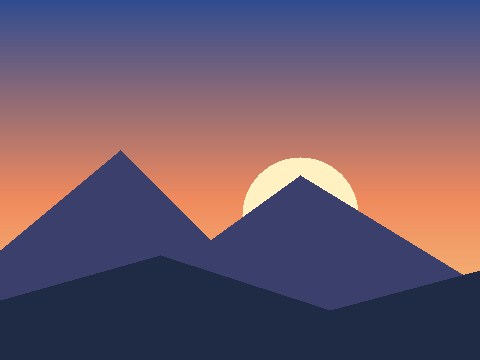
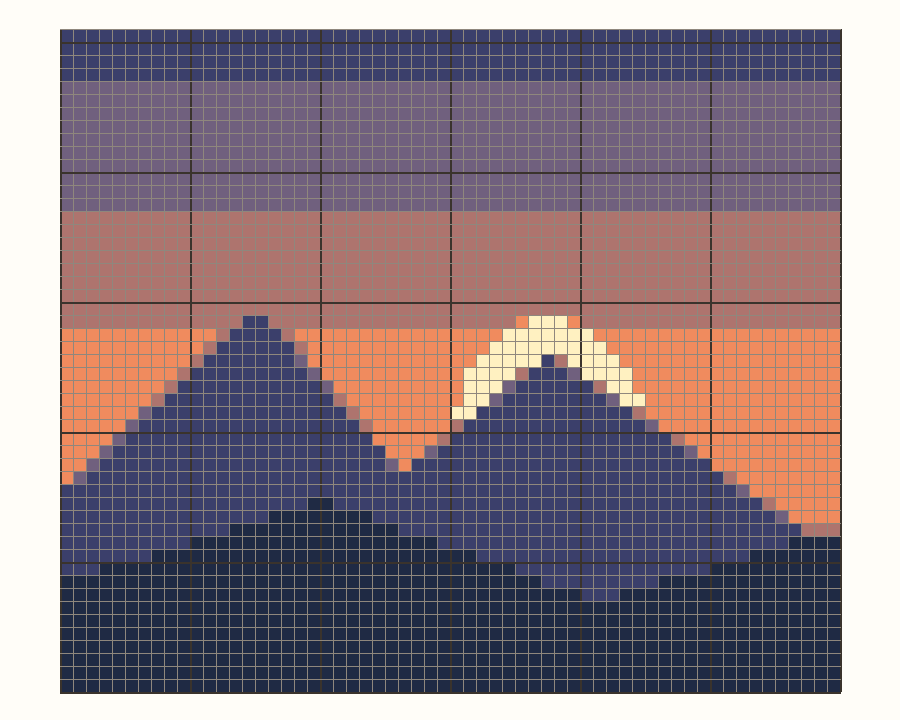
Actual output from this tool: an original sample picture converted to a single crochet graph, with a few of the rows it writes out. Colors get plain names such as Navy or Coral automatically; you can type your own yarn names under Yarn colors.
Turning rows (rows 8–10)
- Row 8 (WS, →): 40 sc Navy, 3 sc Indigo, 17 sc Navy (60 sts)
- Row 9 (RS, ←): 14 sc Navy, 9 sc Indigo, 37 sc Navy (60 sts)
- Row 10 (WS, →): 3 sc Indigo, 32 sc Navy, 15 sc Indigo, 10 sc Navy (60 sts)
The same graph in C2C (rows 14–16)
- Row 14 (WS, from the bottom edge, increase at both ends): 12 Navy, 1 Brown, 1 Coral (14 tiles)
- Row 15 (RS, from the right edge, increase at both ends): 2 Coral, 1 Brown, 12 Navy (15 tiles)
- Row 16 (WS, from the bottom edge, increase at both ends): 11 Navy, 2 Indigo, 3 Coral (16 tiles)
How to make a crochet graph from a picture
Add a picture or start blank
Choose an image and a color limit, then press Convert. Use Crop picture to frame the subject; a close crop gives the cleanest graph. Use artwork you own or have permission to reproduce.
Set the width and gauge
Enter how many stitches across you want and your gauge. Rows follow the picture’s proportions, so a circle stays round even though crochet stitches are not square.
Clean up the graph
Repaint single stitches, fill an area, or use Replace one color everywhere to merge two close shades and cut down on color changes.
Follow the rows or download
Press Follow along to work one row and one color at a time, with your place saved, or download a color PDF with the chart, a yarn list and every row written out. A PNG and a plain-text pattern are there too.
Single crochet or C2C?
This maker draws color graphs — also called crochet grids or colorwork charts — where each square is one stitch or one tile. It does not draw stitch-symbol diagrams.
| Technique | One square is | How you read it | Best for |
|---|---|---|---|
| Single crochet, turning rows | One single crochet stitch | Row 1 is the bottom row. Odd rows (right side) read right to left, even rows (wrong side) left to right | Detailed pictures, graphgans, pillows and bags worked flat |
| Single crochet, same direction | One single crochet stitch | Every row reads right to left on the right side, as when you cut the yarn at the end of each row | Colorwork where you want every row to face you, without wrong-side rows |
| Corner to corner (C2C) | One tile: chain 3 and 3 double crochet | Start with one tile at the bottom-right corner and work diagonal rows toward the top-left, increasing then decreasing | Blankets that grow quickly with bold, simple shapes |
C2C shaping follows the method described in Sarah Maker’s C2C tutorial. Which end of each diagonal you start from varies between designers; this tool alternates in the common way and says the starting edge on every row.
How many stitches for a blanket or pillow?
Stitches and rows at this maker’s default gauge: 16 single crochet × 18 rows, or 4 × 4 C2C tiles, per 10 cm (4 in). Thicker yarn needs fewer; set your own gauge in the tool to see your finished size.
| Project | Example size | Single crochet | C2C tiles |
|---|---|---|---|
| Coaster | 4 × 4 in (10 × 10 cm) | 16 × 18 | 4 × 4 |
| Pillow cover | 16 × 16 in (41 × 41 cm) | 65 × 73 | 16 × 16 |
| Baby blanket | 30 × 36 in (76 × 91 cm) | 122 × 165 | 30 × 37 |
| Throw | 50 × 60 in (127 × 152 cm) | 203 × 274 | 51 × 61 |
| Twin bed | 66 × 90 in (168 × 229 cm) | 268 × 411, over the 300-row limit; use bulky yarn (about 159 × 244) or C2C | 67 × 91 |
How to read a crochet graph
- Start at the bottom
- Row 1 is the bottom row of the graph. Each square is one stitch in the color shown, and you work upward one row at a time.
- Turning rows go back and forth
- Right-side rows (odd numbers) read from right to left. Wrong-side rows (even numbers) read from left to right, because the work is turned. Row numbers sit on the side where each row begins, with an arrow.
- Same-direction rows
- When every row is worked from the right side, every row reads right to left. Choose Single crochet, same direction so the numbers and arrows match.
- C2C reads in diagonals
- Start with the single tile in the bottom-right corner, then work diagonal rows toward the top-left. Each written C2C row names its starting edge and where to increase or decrease.
- Or follow the written rows
- Every row is also written out in working order, such as “Row 2 (WS, →): 4 sc Cream, 3 sc Navy”, so you do not have to count squares. The rows, the graph and the PDF come from the same data; tick rows off as you go and your place is saved on this device.
Heavier lines every 10 squares, counted from the bottom-right corner, help you keep your place. Columns are numbered from the right edge too.
Get a cleaner crochet graph
- The subject turns to mush
- Use Crop picture to cut in closer to the subject, or add stitches across. Small details need more stitches to show.
- There are too many colors
- Lower the color limit and convert again, or merge similar shades with Replace one color everywhere. Fewer colors means fewer yarn changes.
- The finished piece is too long
- Check your gauge. More rows per 10 cm makes a shorter piece; the finished size is shown under the size controls.
- Lots of single stitches in a stray color
- Make sure Smooth shading is off, convert again, then fill or repaint the leftover specks.
Crochet graph maker FAQ
Is this crochet graph maker free?
Yes, without an account. Several popular crochet graph tools put written rows or PDF downloads behind a paid plan; here graphs up to 300 × 300 stitches, the written rows, the color PDF, the PNG and the text pattern are all free. Nothing is printed over the chart itself; PDF pages show the site name and page number in small footer text, and the PNG has the site name in one corner.
How do I make a crochet graph from a picture?
Choose an image, pick how many colors to use, set the width and gauge, then press Convert. Touch up the result and download it. The steps above walk through each part.
Does my picture get uploaded?
No. The picture is converted in your browser and is never uploaded. Your chart is saved in this browser’s local storage when available, and clearing site data removes it. Optional site analytics follow your cookie choices and never receive your picture or chart.
How big can a crochet graph be?
Up to 300 stitches across and 300 rows, which is 90,000 squares. How big that is in fabric depends on your gauge; the tool shows the finished size in centimeters and inches.
How many stitches wide should a crochet blanket be?
It depends on your gauge. At a typical single crochet gauge of 16 stitches per 10 cm, a 50 × 60 in (127 × 152 cm) throw is about 203 stitches across and 274 rows, and a 30 × 36 in baby blanket is about 122 × 165. In C2C at 4 tiles per 10 cm, the same throw is about 51 × 61 tiles. Enter your own gauge in the tool to see the finished size.
What is a graphgan?
A graphgan is a blanket worked from a graph, where each square on the chart is one stitch or one C2C tile. Single crochet and C2C are the most common ways to make one.
Can I use my own yarn colors?
Yes. Converted colors start with plain names such as Navy or Coral. Under Yarn colors, change any color to match your yarn and type its name, such as a brand and shade. Your names appear in the color list, the written rows and every download.
How much yarn will I need?
The color list gives an approximate length in meters and yards for each color, based on its stitch count and your gauge, plus 15% extra. Enter the length on your yarn label to see how many balls of each color to buy. Yarn, hook and tension all change the real amount, so crochet a small swatch and buy a little more.