LOCAL QR CHART TOOL
Perler Bead QR Code Pattern Maker
Make a Perler bead QR code from a link or text, check the actual PNG, and get a printable chart with bead counts. Choose Perler, Hama, Artkal A, Nabbi or MARD. Your text stays in this browser; the pattern, material list and exports use one matrix.
Build the chart
Load colors, then generate a current chart.
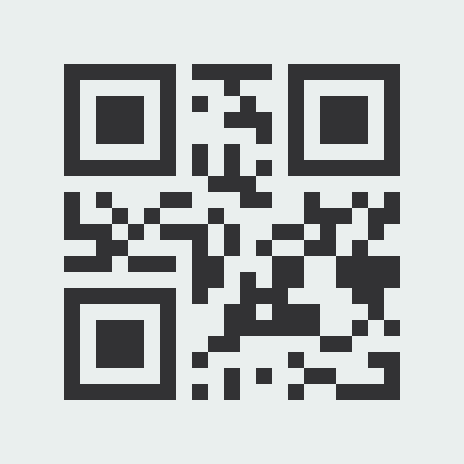
Make a QR bead chart you can check
The full bead width is W = (n + 2q) × s: QR modules n, quiet-zone modules q, and beads per module s. Finished width is W × pitch mm. The material total includes every light border bead.
Brand color names and screen colors are approximate. Contrast, fusing, phone camera, lighting, distance and angle can all affect a physical result. Test your fused piece with your own phone in its intended light; this page does not predict physical scanning.
Each PNG is locally decoded again from its encoded pixels and reports the result. A missing, mismatched or decoding-error state is not a pass.
Try the photo-to-bead converter, pixel art converter, or our color and data guide for different pattern tasks.
Read QR background and error-correction guidance from DENSO WAVE’s QR Code guide and error-correction overview.
How to make a Perler bead QR code
For a link sign or a text message, plan the whole square before laying out beads. You need the two listed bead colors, compatible pegboards, placement tweezers and your manufacturer's fusing supplies. Use this workflow with the local maker above.
Choose the exact content
Enter the final link or text in the maker above. Open a web address yourself to check its destination; this tool encodes it without visiting it. Shorter content may need fewer modules. Prefer a durable address you control, and remove tracking parameters only if the destination still works. Spaces, capitalization and line breaks are preserved.
Plan the bead size and colors
Start with Perler P18 Black and P01 White, or choose two clearly separated colors from your bead brand. Keep the same bead size throughout the piece and check your physical stock against the material list. The light cells, including the outside border, are actual beads in this chart, not empty pegboard holes.
Set the layout and check the footprint
Begin with error correction M, one bead per module and a four-module quiet zone. Generate the chart, then read its complete width and board layout. A module is one QR square: at two beads per module, each module becomes a 2 × 2 block of four beads. More error correction can increase the QR version; more beads per module enlarges the same modules.
Verify the export before placing beads
Download Clean QR PNG and read the verification result for that file. The tool decodes the encoded image pixels and compares the recovered content exactly with your input. Use Grid chart PNG or the paged print chart for placement, and Material CSV for shopping. Each PNG is checked separately: a clean-image pass does not prove a heavily labeled chart will decode.
Build, fuse and test the real piece
Place every chart cell, including the continuous light border. Keep the three corner finder patterns and the alternating timing rows intact; add no logo or decorative bead inside the code. Follow your bead manufacturer's fusing instructions. Once the piece has cooled, test it with the intended phones, lighting and distance, and confirm the recovered text or destination. A screen-image pass is not a physical scan guarantee.
Why your QR bead pattern may not scan
First distinguish a failed exported-image check from a failed physical scan. If the export fails, resolve its reported reason before copying beads. If the file passes but the object fails, work through the physical checks below.
The light border was cropped or decorated
Keep at least four light modules on every side, beyond the QR's outermost modules. At two beads per module that is eight light beads on each side. A frame, keyring hole or colored edge must sit outside this area. Export the complete square rather than cropping the border to fit a board.
The colors or labels obscure the pattern
Try the default dark-on-light colors and a Clean QR PNG without grid labels first. Similar brightness, shiny beads and reflections can reduce separation. A screen contrast ratio is only a planning hint, not a scanner threshold or a guarantee. The decoder also attempts inversion, but a reversed-color image pass does not establish compatibility with every phone.
Small modules lose their square structure
Bead holes, gaps, uneven fusing and shadows can change how a camera sees a module. Try two beads per module if the board count and finished size are practical. This doubles each side and quadruples the total bead count. It does not add error-correction data; test the larger real sample rather than assuming it will scan.
The matrix was edited or copied incorrectly
Check the three large finder squares first, then compare the printed tile coordinates and module boundaries with the generated chart. L, M, Q and H are recovery levels, not permission to replace a matching percentage of beads. Changing the border or finder patterns may stop detection altogether. Regenerate after changing the input or settings; do not rely on an old pass.
The image passes but the finished object fails
Check focus, glare, flatness, the complete border and whether the camera can see the entire code. Move the phone to a few distances in even light. If the code decodes but a link fails to open, check the destination and network separately. This page tests digital exports; it has not measured a universal physical scanning distance, melt depth or success rate.
QR versions, byte capacity and bead sizes
These planning rows include the four-module light border. Each width is the side of a square, not its total bead count. Size uses 5 mm pre-fusing pitch; the live maker recalculates for your brand, quiet zone and module scale. A 29 × 29 count is a bounding-box layout reference: check physical board compatibility.
| Version | QR modules | Bytes L / M / Q / H | Beads across 1 / 2 per module | Total beads 1 / 2 per module | 29 × 29 tiles 1 / 2 per module | 5 mm size (cm) 1 / 2 per module |
|---|---|---|---|---|---|---|
| 1 | 21 × 21 | 17 / 14 / 11 / 7 | 29 / 58 | 841 / 3,364 | 1 / 4 | 14.5 / 29.0 |
| 2 | 25 × 25 | 32 / 26 / 20 / 14 | 33 / 66 | 1,089 / 4,356 | 4 / 9 | 16.5 / 33.0 |
| 3 | 29 × 29 | 53 / 42 / 32 / 24 | 37 / 74 | 1,369 / 5,476 | 4 / 9 | 18.5 / 37.0 |
| 4 | 33 × 33 | 78 / 62 / 46 / 34 | 41 / 82 | 1,681 / 6,724 | 4 / 9 | 20.5 / 41.0 |
| 5 | 37 × 37 | 106 / 84 / 60 / 44 | 45 / 90 | 2,025 / 8,100 | 4 / 16 | 22.5 / 45.0 |
| 6 | 41 × 41 | 134 / 106 / 74 / 58 | 49 / 98 | 2,401 / 9,604 | 4 / 16 | 24.5 / 49.0 |
| 7 | 45 × 45 | 154 / 122 / 86 / 64 | 53 / 106 | 2,809 / 11,236 | 4 / 16 | 26.5 / 53.0 |
| 8 | 49 × 49 | 192 / 152 / 108 / 84 | 57 / 114 | 3,249 / 12,996 | 4 / 16 | 28.5 / 57.0 |
| 9 | 53 × 53 | 230 / 180 / 130 / 98 | 61 / 122 | 3,721 / 14,884 | 9 / 25 | 30.5 / 61.0 |
| 10 | 57 × 57 | 271 / 213 / 151 / 119 | 65 / 130 | 4,225 / 16,900 | 9 / 25 | 32.5 / 65.0 |
Byte-mode capacity is the payload in encoded bytes after allowing for mode and length headers. It is not a character limit for Unicode text. Actual segmented encoding can fit some numeric or uppercase text more efficiently; always use the generated version and counts for your own input. The table is a model, not a scan-performance test.
For example, HELLO BEADS at M uses version 1. With one bead per module it is 29 × 29, 841 beads and an estimated 14.5 cm across at 5 mm pitch. With two it is 58 × 58, 3,364 beads, four reference tiles and 29.0 cm. The exact https://example.com/ at M uses version 2: 33 × 33, 1,089 beads, four tiles and 16.5 cm at one bead per module.
Capacity and border background: DENSO WAVE's QR version explanation and four-module margin guidance. Recovery levels: DENSO WAVE's error-correction explanation.
Perler bead QR code FAQ
- Can I make a Perler bead QR code on one 29 × 29 board?
- Yes, the smallest QR version has 21 × 21 modules. With four quiet-zone modules on each side and one bead per module, the full chart is 29 × 29 beads: 841 beads and one 29 × 29 reference board. Not every link fits that version, especially at higher error correction. Read the generated dimensions before buying materials.
- How many beads per module should I use?
- One keeps the project smaller. Two makes each QR module a 2 × 2 bead block, doubling the width and height and using four times as many beads. Three and four are also available, subject to the 160 × 160 full-grid limit. Choose using your material budget and a physical test, not a promised scan rate.
- Which error-correction level should I choose?
- M is the default. L, M, Q and H provide increasing redundancy, conventionally described as about 7%, 15%, 25% and 30% of codewords. Higher redundancy leaves less room for data in a given version and may enlarge the code. These figures are not allowable percentages of wrong beads or a promise that finder patterns can be damaged.
- Does a QR bead pattern have to be black and white?
- Other dark-on-light pairs may work, but Black and White are a useful starting point. Use the exact brand codes in the material list and compare the real beads in the intended light. Similar screen colors or inverted colors deserve extra testing. Neither a contrast hint nor a PNG pass guarantees the fused piece will scan.
- How much text or how long a link will fit?
- It depends on the character encoding, QR version and error correction. The planning table above gives byte-mode capacities, not a universal character count: a UTF-8 character may use several bytes. The encoder can optimize numeric or alphanumeric segments. The tool also has separate 8,192-byte input and 160 × 160 bead-grid limits; either QR capacity or grid size may be reached first.
- Can I use mini beads, Hama, Artkal or Nabbi?
- The maker offers Perler, Hama, Artkal A, Nabbi and MARD palettes with their existing color codes. Its size estimate uses 5 mm pitch for the first four and 2.6 mm for MARD. These are pre-fusing estimates, not measurements of your finished piece. The 29 × 29 tile count is a layout reference, not a claim that every manufacturer's physical board is compatible.
- Can I download a free PNG and print-ready PDF?
- Yes. Clean QR PNG, Grid chart PNG, Material CSV and Print / save PDF use the current matrix. The print view includes a complete verified overview and numbered 29 × 29 placement tiles; choose Save as PDF in your browser. Those placement tiles are neither standalone QR codes nor a 1:1 bead-size template. A failed PNG is explicitly marked unverified, not silently treated as checked.
- Are my link and text uploaded, and can I change them later?
- QR generation and image decoding happen locally in your browser; the tool does not upload the entered content or create a hosted redirect. Changing the encoded text requires a new matrix. Open in editor transfers bead cells and brand codes within the same tab, without the original text or URL; edits may break the code. Anyone who scans the finished QR can read its content, so it is not a way to hide secrets.