food · reference rebuild
Cherry Perler Bead Pattern
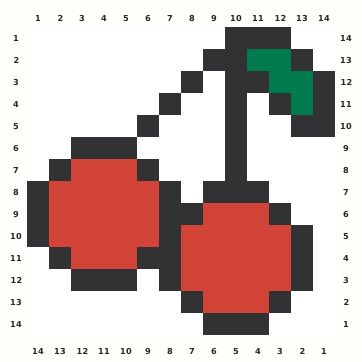
Two red cherries share a thin five-bead green stem structure inside an exact fourteen-cell square, with a dark outline separating the touching fruits.
Edit this pattern online and export a PNG or print-ready PDF for free.
Perler palette · codes hidden · closest screen-color matches
Beige cells are empty pegs; white cells are beads. Brand codes use the closest CIE76 screen-color match from this source palette. Check important shades against physical beads before building.
Perler bead material list
Exact per-color counts for the 14×14 grid, so you can sort cups before you start. Switch the brand above to remap codes, colors and totals on this page.
- Black
P1851 beads - Dark Green
P105 beads - Tomato
P21142 beads
Making notes
Recount both stem branches, both top gaps, and the separate dark outlines where the fruit overlap. Build each lower curve from its own coordinates instead of mirroring one cherry.
Use the paired cherries as a small fruit-set companion with two touching forms. The shared five-bead stem is much thinner than either fruit, so verify both branches before filling red areas. Preserve the dark separation where the cherries meet rather than making one combined red block.
Place the branching stems and their junction first. Outline each cherry independently, fill the red interiors, and compare the lower curves before joining the central seam. Use row 10, the fullest row at 13 occupied positions, as a horizontal recount anchor. The fruit lobes overlap visually but retain distinct dark borders. Keep the stem cells sparse, preserve both top gaps and avoid mirroring one cherry onto the other. Occupied bounds run from row 1 to row 14 and column 1 to column 14.
Pattern layout and bead count
The occupied motif measures 14×14 and is normalized to 14×14 with no normalization padding. No occupied cell is cropped, scaled, mirrored or moved. The 98-bead chart fits one standard 29×29 square pegboard. This framing protects the drupe pedicel geometry. Checkpoints: First occupied row 1: F C10–C12. Confirm the drupe pedicel entry point. Fullest row 10 contains 13 occupied cells; compare its complete left-to-right sequence before fusing. Use it as the drupe pedicel span audit. Rarest role Green Stems occurs 5 times at R2C11, R2C12, R3C12, R3C13, R4C13. Recheck this role beside the drupe pedicel landmark. Padding audit: no normalization padding; active bounds are R1–R14 and C1–C14. The drupe pedicel boundary must remain inside those limits.
Ways to customize this pattern
For an alternate edition, recolor Dark Outline, Green Stems, Cherry Red as separate value roles while leaving every occupied coordinate and 14×14 normalization unchanged. Keep the silhouette-specific landmarks and rare accents distinct at thumbnail size.
Sort the source roles as 51 Dark Outline, 5 Green Stems, 42 Cherry Red. Keep Green Stems distinct even though it contributes only 5 cells; Brand remapping should preserve the same light-to-dark hierarchy and never merge an occupied role with background.
Print and iron checklist
Thin stems heat much faster than the rounded red masses. Fuse each fruit center, feather heat upward into the stems, and cool the junction without bending it. Inspect narrow joints from the reverse before mounting or exporting a replacement chart. Before export, verify the 14×14 coordinates, 98-bead total and the selected brand’s merged color counts against the on-page material list.
Project ideas for Cherry Pair
The paired motif suits a recipe-card clip, fruit-stand label or friendship charm set. Back the shared stem so the two lobes cannot twist apart. Keep labels, dates and explanatory text on a separate backing so the approved silhouette stays unchanged.
The source grid uses F and the other design symbols only as internal color roles. The interactive chart replaces them with the selected manufacturer codes, while its material list combines any roles that map to the same bead color.