Halloween · reference rebuild
Perler Bead Skull Pattern
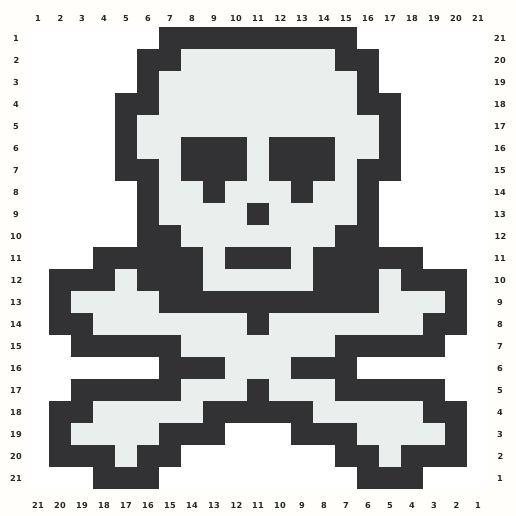
A high-contrast black-and-white skull keeps rounded eye sockets, teeth and crossed bones readable on a square chart.
Edit this pattern online and export a PNG or print-ready PDF for free.
Perler palette · codes hidden · closest screen-color matches
Beige cells are empty pegs; white cells are beads. Brand codes use the closest CIE76 screen-color match from this source palette. Check important shades against physical beads before building.
Perler bead material list
Exact per-color counts for the 21×21 grid, so you can sort cups before you start. Switch the brand above to remap codes, colors and totals on this page.
- Black
P18152 beads - White
P01132 beads
Making notes
Use the nine-cell crown, paired eye sockets and crossed-bone shoulders as anchors. White cells are beads rather than empty board; preserve the raster's edge cells and its one-column normalization padding when copying the 21×21 chart.
A maker looking for a skull Perler bead pattern needs a readable black-and-white skull with eye sockets, teeth and crossed bones, plus a checked grid that is safe to edit, print and export. This 21×21 rebuild keeps the strong high-contrast silhouette while documenting the raster metadata mismatch instead of silently cropping an edge.
Anchor the nine-cell crown and rounded white cranium first, then build the paired eye sockets and small nasal opening around the centerline. Extend the jaw and teeth downward, place the crossed-bone shoulders, and finish the lower bone arms and dark tips only after the skull-to-bone junctions align. The white face is occupied bead material, not empty board. Eye sockets, nose and teeth use different one-cell gaps, while the crossed bones begin at different rows on the two sides. The raster has 19 columns by 21 rows even though the source page reports 18×20; retain the edge cells and add only one blank column per side.
Pattern layout and bead count
The downloaded raster is a 19×21 cell image with 284 occupied cells, while the public metadata says 18×20. Because the visible edge cells are occupied, I preserve the raster evidence, add one blank column on each side, and publish a 21×21 square. The result fits one standard 29×29 square pegboard. Checkpoints: Rows 1–5: keep the nine-cell black crown and stepped white cranium centered between the two padding columns. Rows 6–10: verify the paired black eye sockets, nasal opening and white cheek field before adding the jaw. Rows 11–18: trace both crossed-bone diagonals and their black shoulder junctions; do not mirror away the row offsets. Rows 19–21: preserve the separated lower jaw and bone tips, including every intentional white cell. Metadata audit: record the raster 19×21 extraction versus the page's disclosed 18×20 label, with no occupied edge cropped.
Ways to customize this pattern
Use charcoal and ivory for a quiet bone study, or add a coral accent only as an external backing tile. The grid itself should keep the black sockets and crossed-bone structure intact; avoid adding lettering that would change the generic skull intent.
Black Structure forms 152 outline, socket, jaw and bone beads; White fills 132 face and bone cells. The source page discloses only Black and White, so no shadow role is invented. Keep the white value clearly separate from the empty cells and preserve the black crossbone diagonals when switching Brands.
Print and iron checklist
The skull combines a dense white face with thin black jaw breaks and long bone diagonals. Fuse the bone tips and eye-socket corners lightly before heating the broad face, keep the white teeth openings legible, and cool the wide shoulder line flat so the outer crossbones do not twist. Before export, verify the 21×21 coordinates, 284-bead total and the selected brand’s merged color counts against the on-page material list.
Project ideas for Skull
At 21×21 and 284 beads, Skull suits a Halloween garland, costume-table sign, spooky locker magnet, framed party marker or classroom anatomy tile. Attach a loop behind the solid crown or shoulder bar rather than through an eye socket, tooth gap or bone tip. Use color swaps for a friendly monochrome version without adding a logo or character reference.
The source grid uses F and the other design symbols only as internal color roles. The interactive chart replaces them with the selected manufacturer codes, while its material list combines any roles that map to the same bead color.