Fall · reference rebuild
Pumpkin Perler Bead Pattern
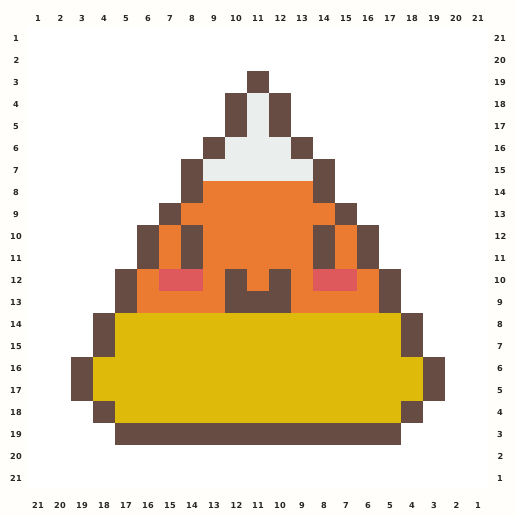
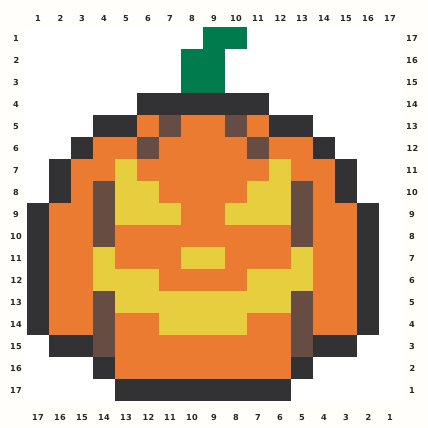
A bright jack-o'-lantern pumpkin uses orange ribs, yellow face cutouts, a green stem and a dark 17×17 outline.
Edit this pattern online and export a PNG or print-ready PDF for free.
Perler palette · codes hidden · closest screen-color matches
Beige cells are empty pegs; white cells are beads. Brand codes use the closest CIE76 screen-color match from this source palette. Check important shades against physical beads before building.
Perler bead material list
Exact per-color counts for the 17×17 grid, so you can sort cups before you start. Switch the brand above to remap codes, colors and totals on this page.
- Dark Green
P106 beads - Black
P1842 beads - Orange
P0492 beads - Brown
P1216 beads - Yellow
P0334 beads
Making notes
Anchor the green stem and dark top notch, then fill the orange ribs around the separated yellow face cutouts. The right-side normalization column and long lower outline must stay blank and straight.
This page targets pumpkin Perler bead pattern searches with a readable jack-o'-lantern tile. Makers can follow the stepped stem, dark outer contour, orange ribs and yellow cutout expression, then edit the exact 17×17 grid, change bead Brands and export a counted PNG or print-ready PDF for a fall or Halloween project.
Place the green stem and dark top notch first, then outline the pumpkin shoulders from the center outward. Fill orange ribs in connected vertical bands, preserving the darker brown-orange separators. Add the yellow eyes and mouth only after the body is stable, and finish the bottom outline as a single grounding row so the face remains centered. The active source is 16 columns by 17 rows, so the final square adds one blank column on the right. The stem leans slightly within the top area and the yellow face is not a generic repeated smile: its eyes, nose and mouth use different widths. Keep the right normalization column empty and measure each orange rib from the numbered top ruler.
Pattern layout and bead count
The public chart reports a 16×17 active area and 190 occupied cells. Normalizing to the editor square adds one blank column on the right without cropping or shifting the pumpkin. The resulting 17×17 pattern fits one standard 29×29 board; the empty column is part of the exported coordinate system and is documented rather than silently removed. Checkpoints: Rows 1–4: keep the green stem, dark top notch and first orange shoulder steps aligned to the left edge of the active area. Rows 5–12: preserve the five-value rib structure and both yellow eye openings without joining adjacent cutouts. Rows 13–16: recount the long yellow mouth, lower orange ribs and side contour corners. Column 17: leave the right-side normalization column blank from top to bottom.
Ways to customize this pattern
A plain autumn pumpkin can replace the yellow face with cream, while a Halloween version can deepen the orange and brown ribs. Keep the green stem and dark contour unchanged.
Pumpkin Orange fills the main fruit, Charcoal Outline defines the silhouette, Golden Face supplies the illuminated cutouts, Brown-Rust Ribs creates depth, and Leaf Green marks the stem. Preserve the value order when recoloring: the face must remain visibly lighter than the orange body, while the stem needs contrast against the dark top edge.
Print and iron checklist
Broad orange fields hold heat while the thin green stem, dark shoulder corners and yellow facial channels are more vulnerable to shifting. Fuse the body in short sections, verify that each yellow opening remains separated from its neighbor, and cool the piece under a flat weight so the upper stem and side ribs do not bow. Before export, verify the 17×17 coordinates, 190-bead total and the selected brand’s merged color counts against the on-page material list.
Project ideas for Pumpkin
This pumpkin suits a Halloween garland, fall classroom token, trick-or-treat sign, harvest basket tag or seasonal refrigerator magnet. Put a hanger or adhesive behind the dense lower body and keep holes out of the thin stem. For a non-spooky autumn version, change the face to solid yellow or cream while preserving the dark contour and the asymmetric blank margin.
The source grid uses O and the other design symbols only as internal color roles. The interactive chart replaces them with the selected manufacturer codes, while its material list combines any roles that map to the same bead color.