Mythical · reference rebuild
Dragon Perler Bead Pattern
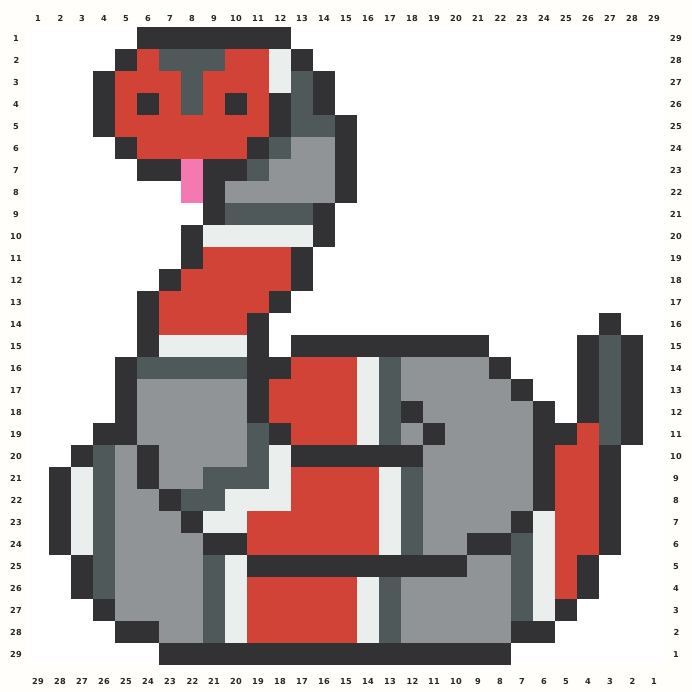
A generic side-view dragon combines a red body, spiked grey wings, a dark lower tail and four tiny yellow eye cells.
Edit this pattern online and export a PNG or print-ready PDF for free.
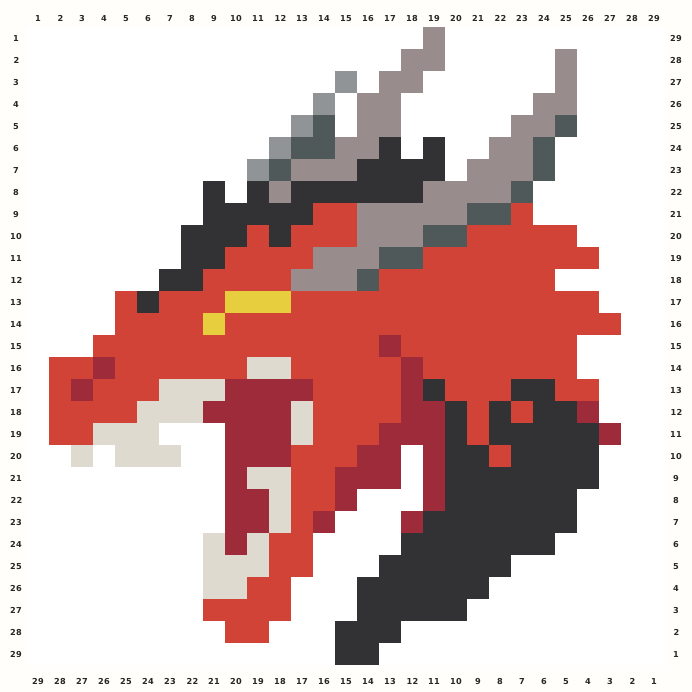
Perler palette · codes hidden · closest screen-color matches
Beige cells are empty pegs; white cells are beads. Brand codes use the closest CIE76 screen-color match from this source palette. Check important shades against physical beads before building.
Perler bead material list
Exact per-color counts for the 29×29 grid, so you can sort cups before you start. Switch the brand above to remap codes, colors and totals on this page.
- Stone
P26044 beads - Grey
P175 beads - Charcoal
P20715 beads - Black
P1896 beads - Tomato
P211167 beads - Yellow
P034 beads - Red
P0543 beads - Toasted Marshmallow
P20828 beads
Making notes
Keep the side-view direction from the tall grey wing tips to the dark lower tail. The red body is broad, but the yellow eye cells, pale wing breaks and three-column normalization margin are the fast orientation checks.
This page is for makers searching for a generic dragon Perler bead pattern with wings, a long red body and a dark lower tail. The 29×29 normalized chart keeps the public side-view direction and fantasy-animal silhouette while avoiding named characters or franchise marks.
Trace the wing tips and back ridge first, then build the red torso from the neck toward the belly. Add the grey wing planes and yellow eye accents, construct the dark lower tail, and finish the small red limb steps only after the wing-to-body joins are secure. The dragon uses separate upper wing spikes, a red jaw, a pale inner wing and a dark lower tail that cross different rows. Preserve the one-column left and two-column right normalization margins, keep the four yellow detail cells isolated, and do not rotate the side profile.
Pattern layout and bead count
The source active bbox is 26×29 with 402 occupied cells. I add one blank column on the left and two on the right to make a 29×29 square, preserving all occupied rows and the original side-view orientation; one standard board fits the chart. Checkpoints: Rows 1–8: follow the staggered wing tips, grey inner planes and upper back ridge without filling either side margin. Rows 9–15: check the red neck, yellow eye cells and the first belly transition before joining the wing to the body. Rows 16–23: preserve the pale wing cutouts, dark lower tail and uneven red limb steps; the side profile must not become mirrored. Rows 24–29: retain the tapering tail tip and the two-column right normalization margin through the final export.
Ways to customize this pattern
Shift the red body toward copper, plum or forest while retaining a darker tail and cool wing values. A fantasy colorway may recolor the eye cells, but should never add a crest, lettering or franchise emblem to the approved grid.
Red Body carries 167 beads, Charcoal Tail and Structure 96, Dark Red Shadow 43, Stone Grey 44, Light Stone 28, Mid Grey 15, Grey Detail five and Yellow Eye four. Keep the two reds visibly separate and retain a cool grey-to-red value break across the wing and tail.
Print and iron checklist
Long diagonal wings and the lower tail contain thin unsupported ends beside a dense red torso. Fuse the wing tips, jaw steps and tail points with brief passes, then heat the broad body in sections and cool flat so the diagonal silhouette does not sag. Before export, verify the 29×29 coordinates, 402-bead total and the selected brand’s merged color counts against the on-page material list.
Project ideas for Dragon
This generic dragon suits a fantasy-reading display, tabletop campaign prop, mythology worksheet, party banner tile or backpack patch. Support the piece beneath the torso or wing root, never at a spike, jaw tip or lower tail point, and keep any campaign lettering external.
The source grid uses R and the other design symbols only as internal color roles. The interactive chart replaces them with the selected manufacturer codes, while its material list combines any roles that map to the same bead color.