Animals · reference rebuild
Alligator Perler Bead Pattern
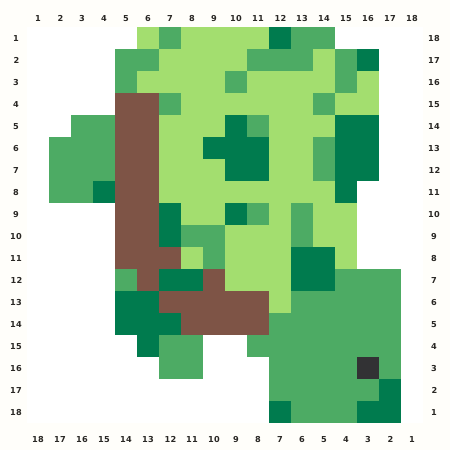
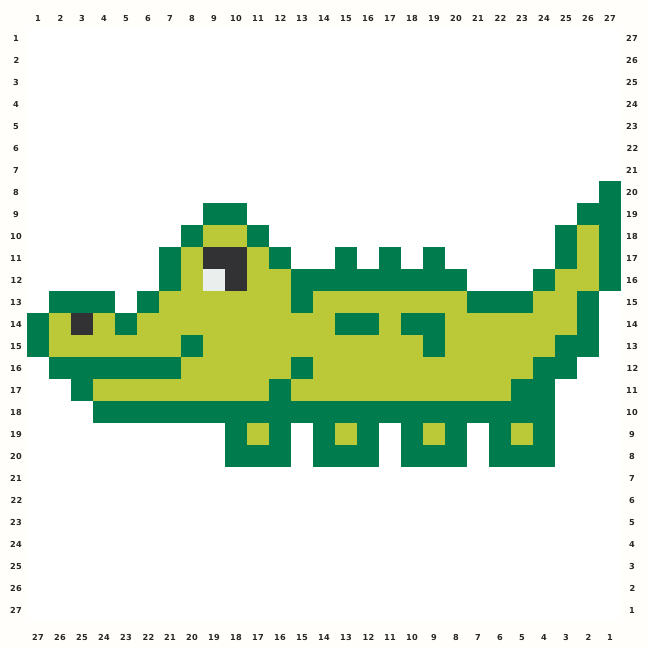
A long friendly alligator stretches across a centered square, pairing lime and deep green scales with a tiny dark eye and stepped tail.
Edit this pattern online and export a PNG or print-ready PDF for free.
Perler palette · codes hidden · closest screen-color matches
Beige cells are empty pegs; white cells are beads. Brand codes use the closest CIE76 screen-color match from this source palette. Check important shades against physical beads before building.
Perler bead material list
Exact per-color counts for the 27×27 grid, so you can sort cups before you start. Switch the brand above to remap codes, colors and totals on this page.
- Dark Green
P10102 beads - Prickly Pear
P97102 beads - Black
P184 beads - White
P011 beads
Making notes
Leave seven blank rows above and below the 27×13 active alligator. Build the deep and lime green ridge from snout to tail, then verify the four dark details and single pale eye before fusing the sparse feet.
This alligator Perler bead pattern answers a generic reptile craft search with a long side profile, low legs and a readable snout. The 27×27 normalized grid keeps the 209-bead animal centered inside one board, so makers can edit the silhouette, switch Brands and export a coordinate-safe guide.
Build the dorsal ridge from the snout toward the tail, placing the deep-green D outline before the lighter L body. Add the single pale f eye and the four dark k facial cells, then step the belly and four short feet downward while keeping the tail tip connected. Only 13 of the 27 final rows contain occupied cells; seven blank rows sit above and seven below the cropped source. Preserve the long one-cell tail rise at the far right, the short snout at the far left, and the dotted gaps between the four feet instead of closing the animal into a rectangle.
Pattern layout and bead count
The active alligator measures 27×13. I retain its orientation and add seven blank rows above and seven below to make a 27×27 square. The 209-bead chart fits one standard 29×29 Midi board; the empty vertical frame is part of the export coordinates. Checkpoints: Rows 1–7: leave the seven top normalization rows blank; the first occupied tail cell begins at row 8, column 27. Rows 8–13: count the snout rise, four k details and paired green D/L ridges before the belly widens. Rows 14–20: verify the fullest rows are 14 and 15 with 26 occupied cells and keep all four lower foot gaps open. Rows 21–27: retain seven blank bottom rows and reconcile 102 D, 102 L, four k and one f bead.
Ways to customize this pattern
Recolor the two greens toward swamp olive, mint or turquoise while retaining a high-contrast eye and contour. Keep the 27×27 vertical padding and the separated toes; never fill the seven-row margins.
Deep green D and lime L each carry 102 beads, creating the two-value body and contour. Dark k contributes four facial/foot details, and pale f is the single eye bead. Do not merge f into the blank background; the eye is the smallest but most important occupied role.
Print and iron checklist
The alligator is a sparse horizontal form with many one-cell teeth, toes and back steps. Fuse from the broad middle belly outward, make short passes over the dorsal ridge, and support the isolated tail tip. Cool under weight so the 27-column body stays straight. Before export, verify the 27×27 coordinates, 209-bead total and the selected brand’s merged color counts against the on-page material list.
Project ideas for Alligator
The side profile works for a swamp-life-cycle card, child-room plaque, reptile-unit display or long banner repeat. Add a rigid backing behind the belly and feet, never across the tail gaps. A marsh palette can shift D and L, but the eye and stepped contour should stay high contrast.
The source grid uses D and the other design symbols only as internal color roles. The interactive chart replaces them with the selected manufacturer codes, while its material list combines any roles that map to the same bead color.